Add to Chrome
Free Chrome extension

Any web page, a clean spreadsheet

DigUp finds the tables and lists on a page and exports every row to CSV, Excel, JSON or Google Sheets in one click. No account, no limits, and nothing you copy leaves your browser.

The video plays from YouTube, in its privacy-enhanced mode, only when you press play.

FreeNo credits, no row limits
No accountInstall and start
On your devicePages read in your browser
5 formatsCSV, Excel, JSON, PDF, Sheets

Three steps, a few seconds

Open it, keep the columns you want, export. That's the whole thing.

  1. Open DigUp on any page

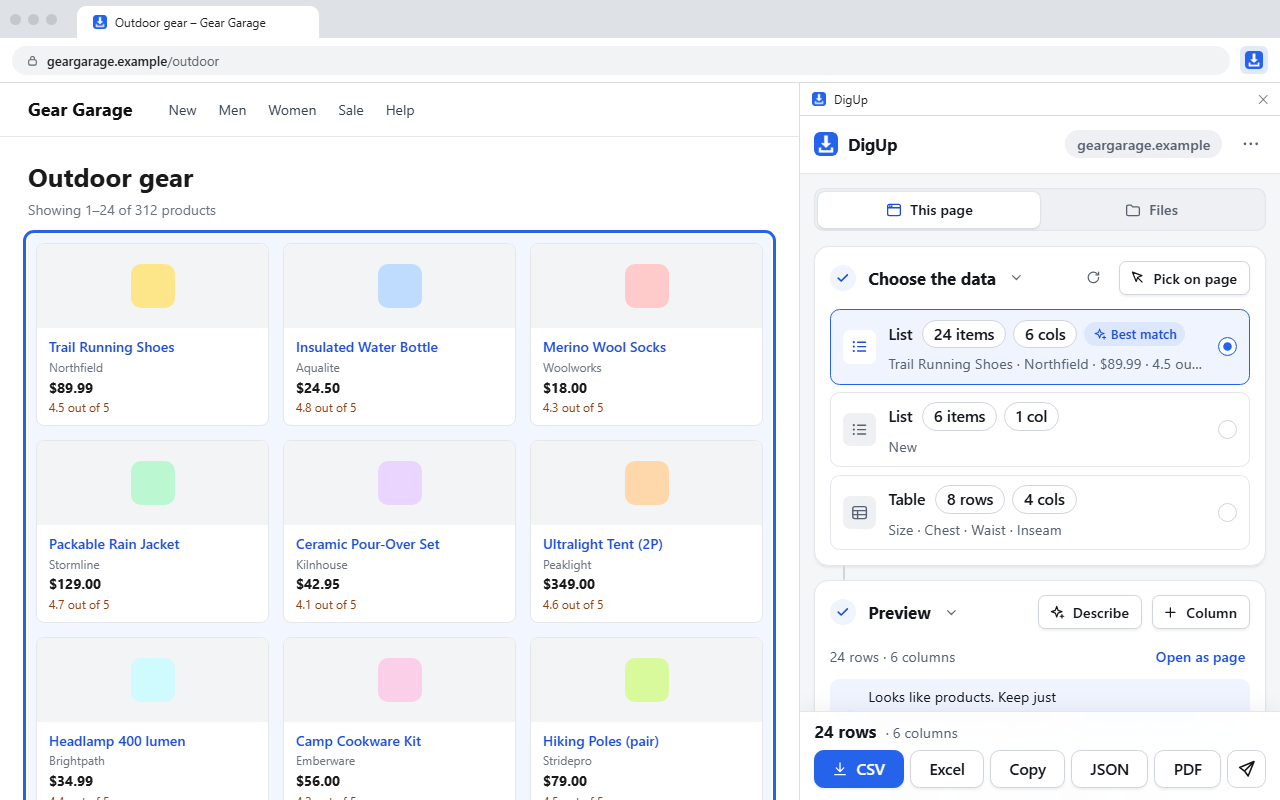
    Click the DigUp icon or press Alt+Shift+D. It finds the tables and lists and picks the best one.

  2. Get the columns you need

    Clear names like Title, Price and Email. Use Quick columns, type what you want, or rename and reorder.

  3. Export or send

    CSV, Excel, JSON, a new Google Sheet, or your own apps through a webhook. Every page, if you like.

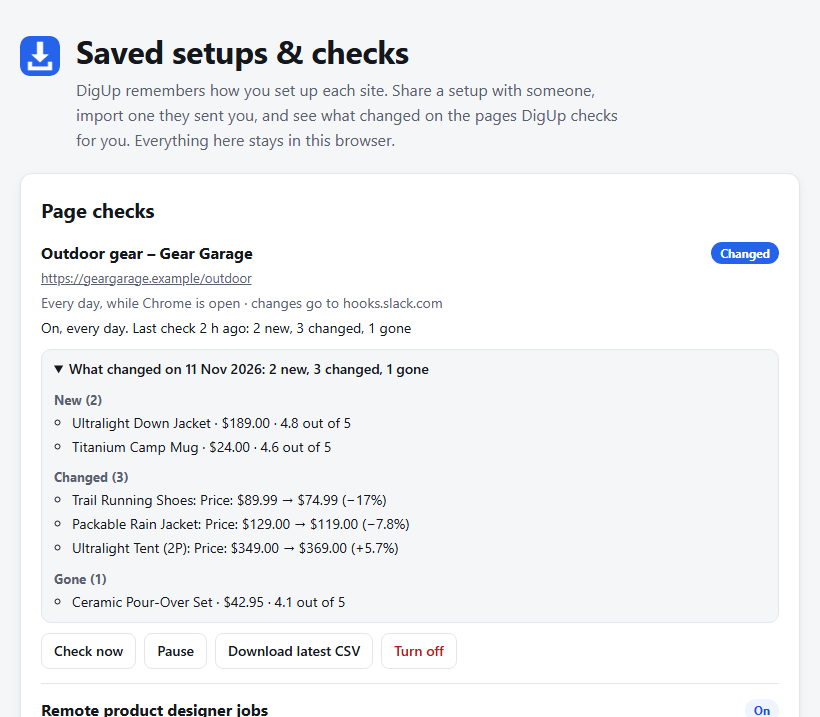
DigUp's Saved setups page: 2 new, 3 changed and 1 gone, with Trail Running Shoes down from $89.99 to $74.99 (−17%).
New in DigUp

Know the moment a price drops

Turn on a check and DigUp reads the page again every 12 hours, day or week. New, changed and gone rows are marked, price drops come first, and a price history shows the trend.

Try page checks

So much more than copy and paste

Everything you need from a scraper, without the account, the credits or the learning curve.

Quick columns

The right columns for the lists you scrape most

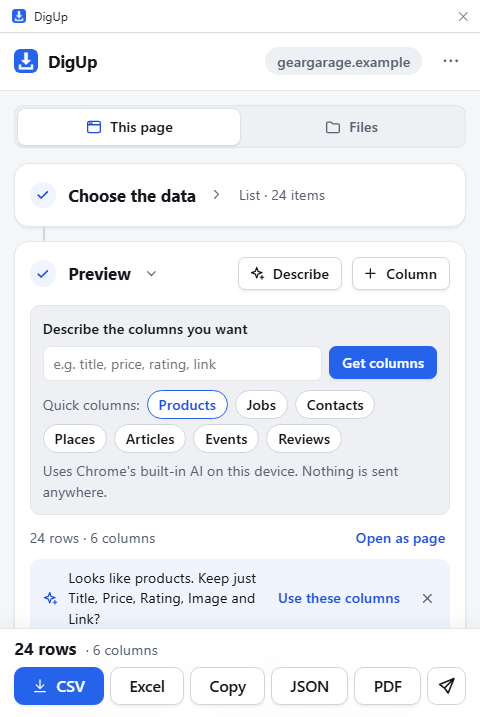
DigUp notices when a list looks like products, jobs, contacts, places, articles, events or reviews, and offers the usual columns in one click.

  • Type columns in plain words: "title, price without currency"
  • AI columns with Chrome's built-in AI, on your device
Try Quick columns
Quick columns: DigUp suggests keeping Title, Price, Rating, Image and Link for a product list.
Send anywhere

Rows go straight to where you work

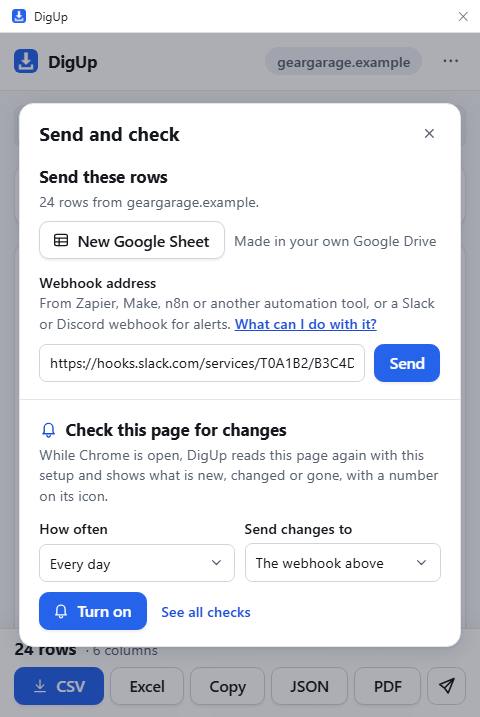
One click makes a new Google Sheet in your own Drive. A webhook sends rows to your automation tool, your CRM, or straight to Slack or Discord.

  • DigUp only sees the sheets it creates
  • Ready-made webhook recipes
Read the webhook guide
The Send and check window: New Google Sheet, a webhook address, and Check this page for changes.
Every page

Every page, and details from each item

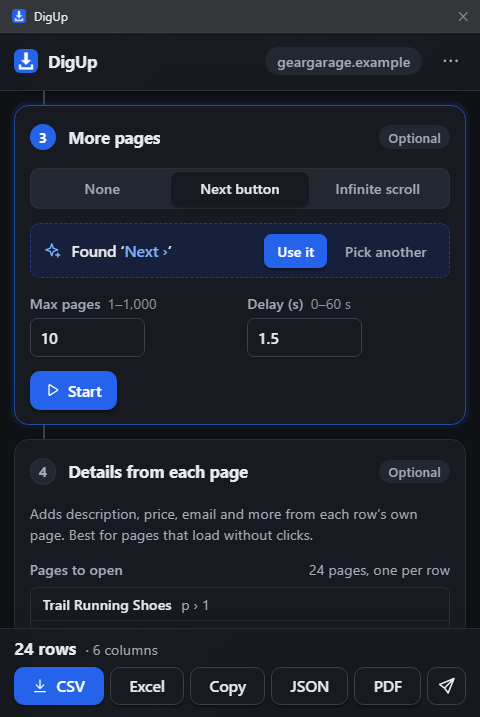
DigUp finds the Next button for you, or scrolls lists that load as you go. It can open each item's own page and add description, company, date, email and phone.

  • A delay between pages and a page limit you set
  • Stops at bot checks and sign-in pages, never gets past them
Try it on any list
DigUp in dark mode, having found the page's Next button, ready to collect more pages.
More features and step-by-step guides

Every feature, and 12 use cases explained in a few simple steps.

Made for real work

People use DigUp every day for

  • Lead listsDirectories and member pages, with Email and Phone found for you
  • Price trackingShop pages checked every day, price drops first
  • Job researchTitles, companies, locations and salaries, new postings flagged
  • Listings and reviewsProperties, events, ratings and search results in one sheet
  • Research and journalismTables and lists from public sources, exact and repeatable
  • AI agentsYour AI app asks, DigUp scrapes in your own Chrome. Guide

Why people switch to DigUp

How it compares with credit-based AI scrapers.

DigUp

Price
Free, no limits
Account
None
Your data
Stays in your browser
Results
Every row, exactly as shown
Next time
Same columns in one click

Typical AI scraper extension

Price
Monthly credits, paid plans
Account
Sign-up required
Your data
Pages sent to their servers
Results
AI may skip rows or change values
Next time
Each run is interpreted again

Go further

Questions

Is DigUp really free?

Yes. No account, no credits and no row limits. Everything runs on your computer, so there are no servers to pay for.

Does DigUp send my data anywhere?

No. Pages are read in your browser and the data you copy is never sent to the developer. Rows leave your browser only when you send them to a Google Sheet or a webhook you chose. The first time you open DigUp it asks whether to share which features you use and on which sites; that is your choice, and "No thanks" sends nothing. See the privacy policy.

Which websites does it work on?

Most pages with a table or a repeating list: shops, directories, job boards, search results and more. Browser pages and the Chrome Web Store are off-limits to all extensions. Please respect each website's terms of use.

What about CAPTCHAs and sign-in pages?

DigUp never gets past them. If a page asks you to verify or sign in, do it yourself in the tab and press Scan again.

Do page checks run when Chrome is closed?

No. Checks run while Chrome is open, and a missed check runs when Chrome starts again. That is the price of keeping everything on your device.

How do I report a problem or ask for a feature?

Use "Report a problem" in DigUp's menu, the feedback form, or email digup@healthyailabs.com.

Your next spreadsheet is one click away

Free, private, and ready in seconds.

From the maker of DigUp

Want AI built for your business?

Every business has work that eats hours: answering the same questions, moving data between tools, checking the same pages every week. We build custom AI solutions and automated pipelines that take that work off your plate, shaped around your exact needs.

Talk to us